
A Zilon Product

Oxford curriculum, built for KG classrooms
Shama is a digital learning platform for kindergarten. The Shama LMS app runs on Chromebooks and tablets, delivers the Oxford curriculum lesson by lesson, and keeps working when the internet does not.

Built for KGOxford curriculumMapped to the KG scheme of work Tap, listen, learnNo reading or typing needed to start
KG students learning with digital tools
A five year old opens a Chromebook, taps into today's lesson, and works through it at their own pace. The device becomes the pencil, the workbook, and the practice sheet in one.
Shama is designed for that age group first. Large tap targets, audio instructions, no typing required, and a lesson flow a teacher can run with a full classroom of young learners.

The age group Shama is built for
Curriculum delivered lesson by lesson
Ways to connect — online, local server, offline
Plus tablets, from the same app
Why Schools Choose Shama
Why KG schools choose Shama
Run the Oxford KG curriculum on the devices you already own, cut the paperwork around it, and see exactly where every child is.
Manage your school's learning system from one place.
Save staff and teacher time with automated tasks.
Reduce paperwork and manual work.
Manage one campus or multiple campuses easily.
Support your school as it grows.
Track student progress in real time.
Make learning simple, fun, and engaging for students.
Keep students interested with interactive lessons.
Help schools continue learning even with limited internet.
Learn on a Chromebook or tablet, online or offline.
Give children a simple and easy-to-use learning app.
Motivate students with rewards and achievements.
Give students everything they need in one app.
For Schools
Shama Learning Central Management System
The side teachers and administrators use: KG programs and courses, students, teachers, campuses, and the Chromebooks in every classroom.
01
Secure Login for Every User
Every staff member has their own secure login. Teachers, administrators, and management only see the information they need, making the system simple and secure.
02
Complete School Dashboard
View student performance, course progress, assessment results, and reports from one place to make informed decisions.
03
Easy Program & Class Management
Create programs, organize semesters, enroll students, promote them to the next level, and prepare new academic years quickly.
04
Build Interactive Courses
Create lessons, add videos, activities, quizzes, and exams without technical knowledge.
05
Reuse Learning Content
Use a shared library of lessons and activities across multiple courses to save time.
06
Complete Student Management
Maintain student profiles, academic records, parent information, photos, and progress reports in one place.
07
Teacher Management
Manage teacher profiles, course assignments, and staff information easily.
08
Multi-Campus Support
Manage multiple campuses from a single platform while keeping each campus organized.
09
Academic Year Management
Create and manage academic years and terms while preserving historical records.
10
School Device Management
Track school tablets, laptops, and other devices assigned to campuses or students.
11
Flexible User Permissions
Control who can view or manage different areas of the system.
The Shama LMS App
Built for the Chromebook, at home on a tablet
The Shama LMS app is the part students touch every day. It is built first for the Chromebooks schools already buy, and the same app runs on tablets for classrooms that use them.
Chromebook firstAlso runs on tabletsOxford curriculum built in
01 — One App, The Whole KG Year
Every Oxford curriculum lesson, in the order it should be taught
Watching educational videosRead PDF-based learning materialComplete interactive quizzesFollow lessons in a structured orderTrack their progress through their courses
Interactive Quizzes
Learning doesn’t stop after watching a video or reading a lesson. Shama supports six different question types, so students learn and then immediately test their understanding.
Multiple ChoiceTrue / FalseFill in the BlankShort AnswerMatch the PairsMath Problems
02 — Learning Without Depending on the Internet
Schools choose how students connect
This makes Shama particularly useful for schools and communities where reliable internet access is not always available.
Online Mode
Students can use the internet to access and synchronize their learning content and progress.
Local School Server
Schools can run Shama through a local server, allowing students within the school to access educational content without requiring every device to have a direct internet connection.
Completely Offline
Learning content can be downloaded to the device, so children continue studying wherever they are. Once connectivity becomes available, the application synchronizes student progress and content in the background.
03 — Engagement
Turn Learning Into Something Kids Enjoy
One of the biggest challenges in children’s education is keeping students interested. Shama is designed around engagement and motivation, not just content delivery.
Students can see what they have earned through the Hall of Fame, giving them a sense of accomplishment and encouraging them to continue learning.
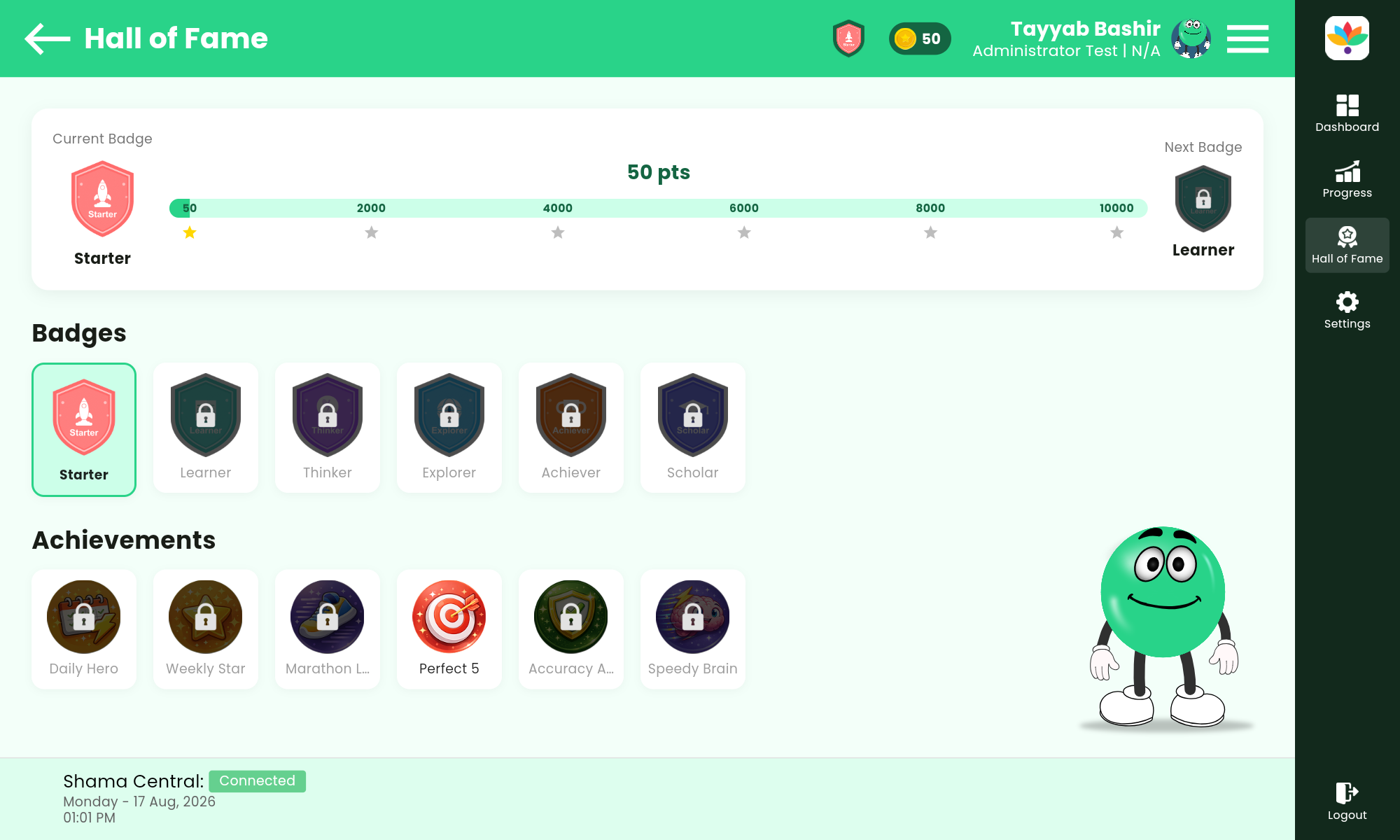
Badges
Achievements
Rewards
04 — Learning Companion
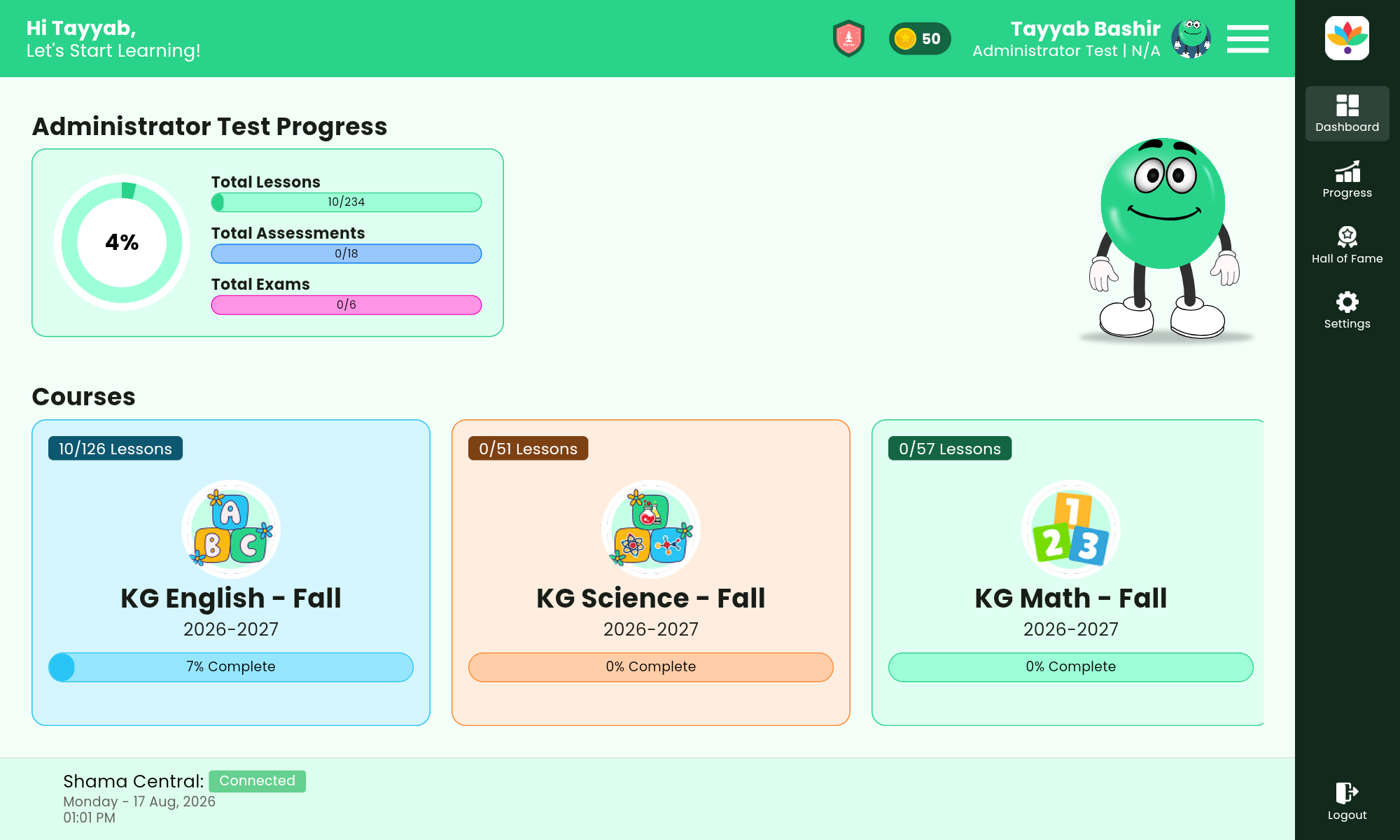
A Learning Companion for Every Child
Shama includes a friendly cartoon character that interacts with the student throughout the application. The character can react to what the child is doing and make the learning environment feel more alive.
This creates a more personal experience for children and helps transform the application from a simple educational tool into a learning companion.
05 — Healthy Breaks
Healthy Learning Breaks
Children aren’t expected to learn continuously without getting tired. Shama can recognize when a student has completed a certain number of lessons or spent a certain amount of time learning.
At the appropriate moment, Shama can suggest a fun learning break — a small game, or a fun or educational video. The goal is to keep children engaged without making the learning experience feel exhausting.
Product Demos
See Shama in action
Five short walkthroughs covering the Shama central dashboard and the Shama LMS app.
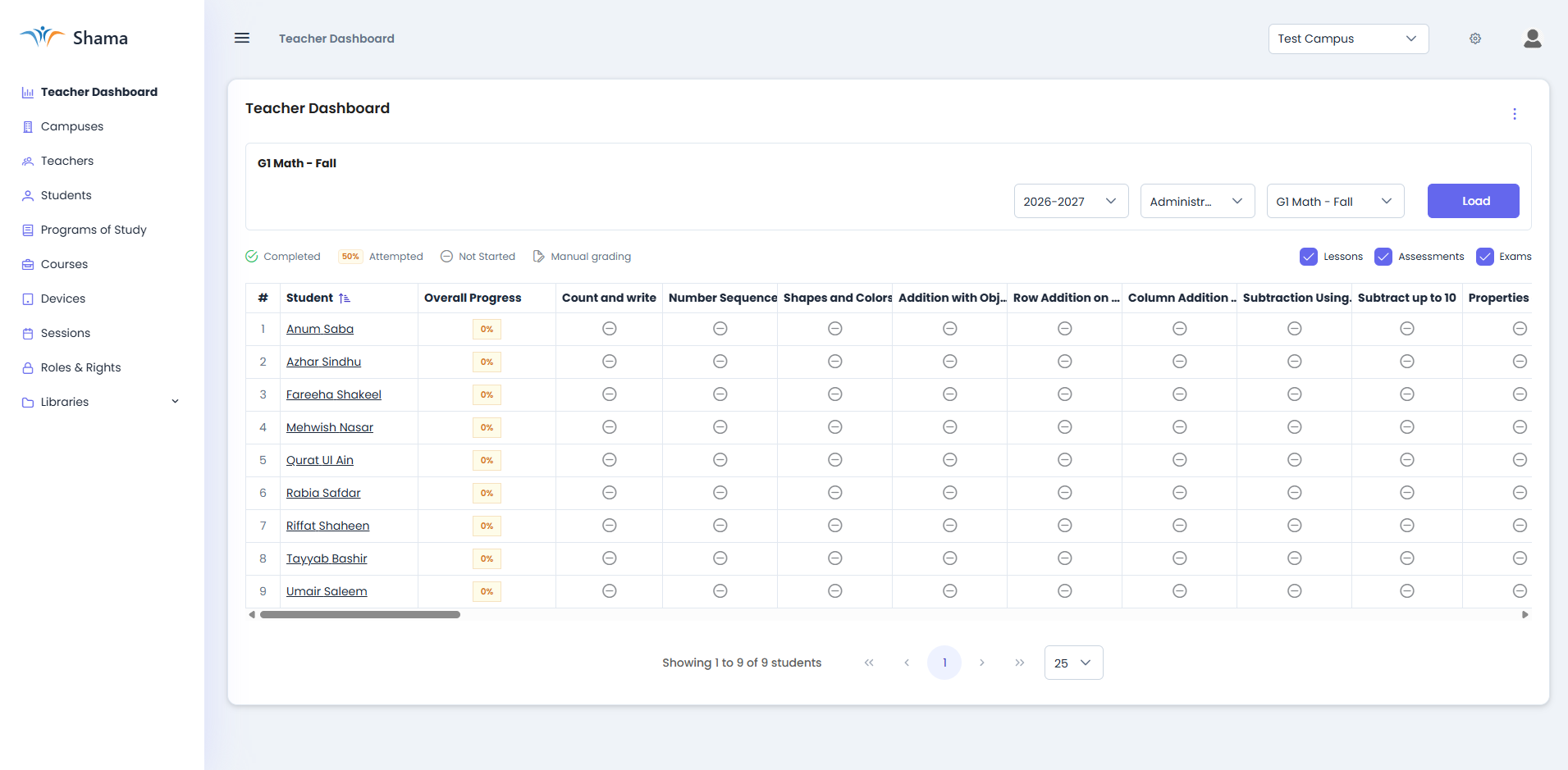
Central Dashboard Overview
A full tour of the Learning Central Management System: schools, campuses, classes, users, and permissions in one place.
Central Dashboard
Course Builder and Content Library
Building courses and sharing lessons across campuses.
Central Dashboard
Attendance, Progress and Reports
Tracking classes and pulling school level reporting.
LMS App
Student App Walkthrough
A student's day in the app: lessons, activities and progress.
LMS App
Offline Learning and Sync
Downloading content, learning offline, syncing later.
How It Works
A healthy rhythm children can keep
Step 1
Learn
Videos and PDF material, in a structured lesson order.
Step 2
Practice
Interactive quizzes across six question types.
Step 3
Achieve
Badges, achievements, and a place in the Hall of Fame.
Step 4
Take a Break
A small game or a fun video, suggested at the right moment.
Step 5
Learn Again
Progress carries forward, online or offline.
06 — Progress
Progress That Can Be Measured
Shama doesn’t just provide educational content — it helps track the student’s learning journey. This turns learning into a measurable journey rather than a collection of disconnected videos and documents.
Students can see, in one place:
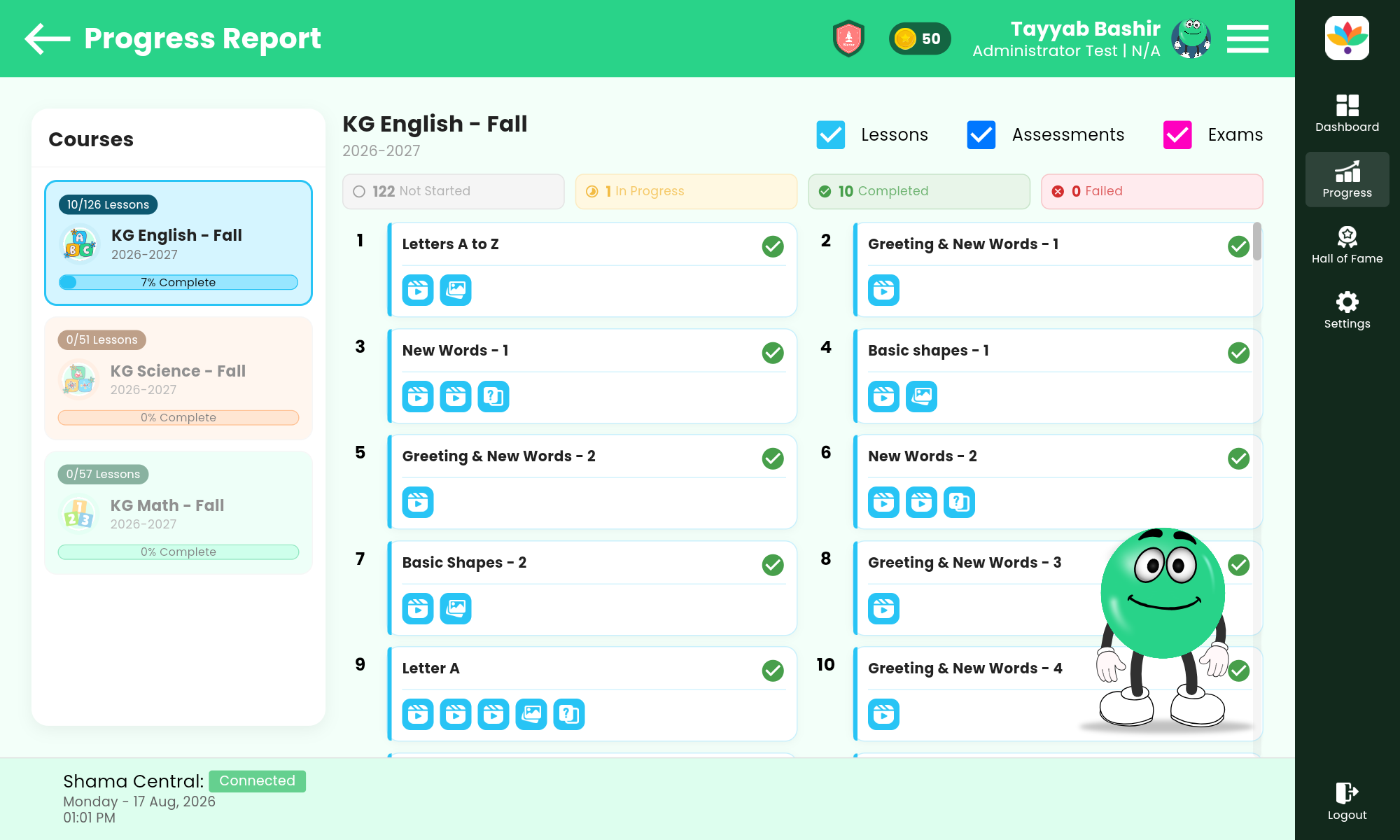
What they have completedWhat they are currently learningWhat remainsHow far they have progressed
Why Shama?
Traditional digital learning often focuses on one thing: “Give the student educational content.” Shama goes further. It combines:
Education+Assessment+Motivation+Progress Tracking+Offline Access+Engagement
into one platform.
The Value for Schools
More than an educational app — a digital learning ecosystem
Schools can deliver structured educational content, allow students to learn at their own pace, support environments with limited connectivity, and give students a more engaging learning experience. Most importantly, Shama is designed around the child.
Most importantly, Shama is designed around the child.

Plans
Choose the plan that fits your school
Every plan includes the Shama app, the Learning Central Management System, and secure logins for your staff. Monthly pricing is billed per school. Larger or offline deployments are quoted after a short scoping call.
Starter
PKR 15,000/ month
One campus, up to 150 students
Shama app for studentsLearning Central Management SystemCourse builder and shared content libraryOnline and offline learning
Request a Quote
Multi Campus
Custom
Unlimited campuses and students
Everything in SchoolMulti-campus management from one platformLocal school server setupDownloadable content for offline devicesBackground sync when connectivity returnsDeployment support from the Zilon team
Contact Sales
FAQ
Questions schools ask
See Shama with your own curriculum
Book a 30-minute walkthrough of the student app and the Learning Central Management System. We will show you how Shama runs online, on a local school server, and completely offline.